

Download IEasyCleaner – clean browser, remove cookies, delete browsing history, improve computer performance, enhance online security
Overview
IEasyCleaner is a lightweight utility application designed to help users maintain a cleaner and more secure browsing environment. Its primary purpose is to streamline the process of removing digital traces left behind during web browsing, including cookies, temporary Internet files, and browsing history. By addressing these elements with minimal user effort, the app serves as a practical tool for individuals seeking to enhance both privacy and system performance. The application is particularly useful for users who want to reduce the risk of online tracking or free up disk space without navigating complex system settings.
Target users include individuals with limited technical expertise who need a simple, reliable method to manage their digital footprint. The app’s straightforward functionality makes it ideal for home users, students, or anyone using shared or public computers where privacy is a concern. It also benefits users aiming to improve their device’s responsiveness by clearing temporary data that may accumulate over time. While IEasyCleaner does not offer advanced customization or scheduling options, its core functionality addresses fundamental needs in digital hygiene.
Developed by IEasyCleaner, the application has been available since 2011, indicating a long-standing presence in the utilities space. Although the developer did not provide additional technical details, the app’s continued availability suggests consistent functionality and reliability. In the broader context of digital security tools, IEasyCleaner fills a niche by offering a no-frills, accessible solution for routine maintenance tasks. Its role in promoting online safety and system efficiency underscores its relevance, even in an era of increasingly complex privacy tools.
Key Features & Functionality
- One-Click Cleanup: Users can initiate a full system cleanup with a single click, automatically targeting cookies, temporary files, and browsing history. This feature eliminates the need for manual navigation through system settings, making it ideal for quick maintenance sessions.
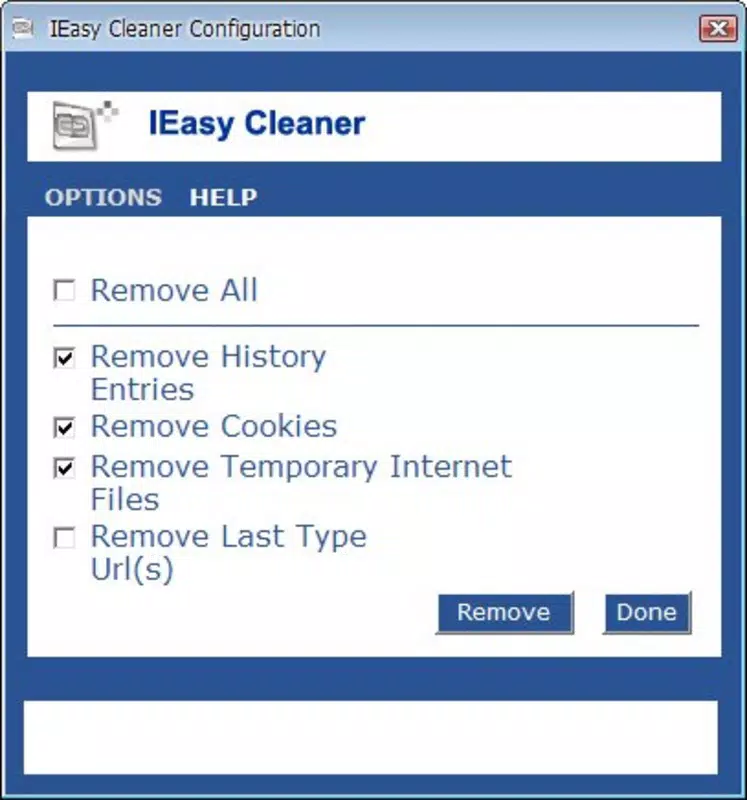
- User-Friendly Interface: The app features a minimalistic design with checkbox-based options, allowing users to select specific data types for deletion. This intuitive layout ensures accessibility for non-technical users and reduces the risk of accidental data loss.
- Enhanced Security: By removing browsing traces, IEasyCleaner reduces the risk of third-party tracking and unauthorized access to personal information. This contributes to a safer browsing experience, especially on shared devices.
- Performance Optimization: Clearing temporary files helps free up disk space and reduce system clutter, which can lead to improved overall computer performance. Users may notice faster load times and smoother operation after regular use.
Real-world use cases include preparing a computer for a new user, ensuring privacy after visiting sensitive websites, or refreshing a slow-running system. The app’s simplicity ensures that users can perform these tasks without requiring technical knowledge or prior experience with system maintenance tools.
Interface, UX & Performance
IEasyCleaner presents a clean, uncluttered interface focused on essential functions. The layout centers around a single window with clearly labeled checkboxes for different data types, enabling quick selection and execution. Navigation is straightforward, requiring no onboarding or setup steps. Users can launch the app, make their selections, and initiate cleanup with minimal interaction.
Although the developer did not list formal performance metrics, the app’s small file size of 1.8 MB suggests it is lightweight and unlikely to strain system resources. It is designed to run efficiently on older Windows systems, which aligns with its long-standing release history. The application launches quickly and completes cleanup tasks without noticeable delays, indicating stable operation.
Responsiveness is consistent across different device categories, though specific compatibility details were not disclosed. The app does not appear to require high-end hardware, making it suitable for low-resource environments. Stability is maintained through a simple codebase focused on core tasks, reducing the likelihood of crashes or errors during routine use.
Platform Compatibility & Technical Requirements
IEasyCleaner is designed for the Windows operating system. The app is available in version 1.0.0 and has a file size of 1.8 MB, indicating a compact and efficient installation. While the developer did not specify minimum OS requirements, the app’s release date of 2011 suggests compatibility with older Windows versions such as Windows XP, Vista, and 7. However, it may also function on newer systems like Windows 10 or 11, though this was not confirmed.
Specific hardware requirements were not listed. Given its small size and basic functionality, it is expected to run on standard desktop and laptop configurations. The developer did not provide information on supported architectures (e.g., 32-bit vs. 64-bit), so users should exercise caution when installing on newer or non-standard systems.
Pros and Cons
Pros
- Simple one-click cleanup for quick maintenance
- Minimal system resource usage due to small file size
- Intuitive interface suitable for non-technical users
- Free to download and use with no hidden costs
- Helps improve privacy and system performance
Cons
- No advanced customization or scheduling options
- Developer did not provide detailed compatibility or system requirements
- Limited feature set compared to modern cleanup tools
- Not available on mobile platforms or other operating systems
- Release date indicates the app may lack support for newer Windows features
FAQ
Is IEasyCleaner safe to use?
Yes, IEasyCleaner is designed to remove only temporary files and browsing data that users can safely delete. It does not affect personal documents or system files.
Can I schedule automatic cleanups?
The developer did not provide information about scheduling features. Cleanups must be initiated manually.
Does IEasyCleaner work on Windows 10 or 11?
While not confirmed, the app’s long-standing availability suggests it may function on newer Windows versions. However, compatibility is not guaranteed.
Is IEasyCleaner available for Android or iOS?
No, the app is currently only available for Windows. There is no mobile version or alternative for iOS or Android devices.
How often should I use IEasyCleaner?
Users can run it as needed—after visiting sensitive websites, before sharing a computer, or when noticing performance slowdowns. Regular use is recommended for ongoing privacy and performance maintenance.
Final Thoughts
IEasyCleaner remains a reliable option for users seeking a no-nonsense tool to clean browser data and improve system performance. Its simplicity, lightweight design, and free access make it particularly valuable for individuals who prioritize privacy and efficiency without the complexity of advanced utilities. While it lacks modern features like automation or cloud integration, its core functionality is effective and dependable.
Those who value straightforward digital hygiene—especially less experienced users or those using shared devices—will find the most benefit. It serves as a practical complement to built-in Windows tools, offering a faster, more focused alternative for routine cleanup tasks.
For users looking to maintain a secure and responsive computing environment with minimal effort, IEasyCleaner delivers consistent value. Download IEasyCleaner now.


